REVIEW · BIG ISLAND OF HAWAII
Big Island – Hawaii Volcanoes National Park Driving Tour
Book on Viator →Operated by Shaka Guide Apps · Bookable on Viator
Drive the crater with a talking GPS. This self-guided Big Island route turns a rental-car day into a story-led visit, with turn-by-turn directions and offline maps so you can move at your pace.
I especially like the hands-free setup: the narration plays automatically as you drive, and it’s built to match where you are on the road. I also love the value math here—one price per vehicle/group with lifetime access to the audio file, so you’re not paying again if you come back.
One drawback to plan around: the tour relies on your phone being ready (downloaded ahead) and on GPS working well. If you try to set things up at the park with spotty signal, you risk missing the best moments and directions.
In This Review
- Key things to know before you go
- A self-guided Volcanoes drive that feels like a real guide
- Start at the park: learn the myths while you take in the rim
- Nahuku–Thurston Lava Tube: the stop that makes volcanology feel tangible
- Kīlauea Iki Trail: crater-floor energy in a short walk
- Chain of Craters Road + Devastation Trail: the “keep driving” payoff
- Pu‘u Loa Petroglyphs: small hike, big cultural weight
- Holei Sea Arch: the 90-foot “where lava meets ocean” moment
- Day 2 inside the park: extra time block for your second pass
- Price and logistics: why $18.39 can be a smart deal
- Real-world tradeoffs: download timing and GPS dependence
- Quick prep checklist I’d follow
- Who this Big Island Volcanoes tour fits best
- Should you book this Volcanoes National Park driving tour?
Key things to know before you go
- GPS-activated audio that plays as you drive, so you’re not constantly tapping your screen
- Offline map support so you’re not stuck when service drops in the park
- Turn-by-turn route guidance that helps you hit the main stops without second-guessing
- Short, focused time blocks at each spot, designed for a realistic driving itinerary
- One group purchase (up to 15) makes it a strong value if you’re road-tripping with others
- Lifetime access means you can reuse the audio later without re-buying
A self-guided Volcanoes drive that feels like a real guide
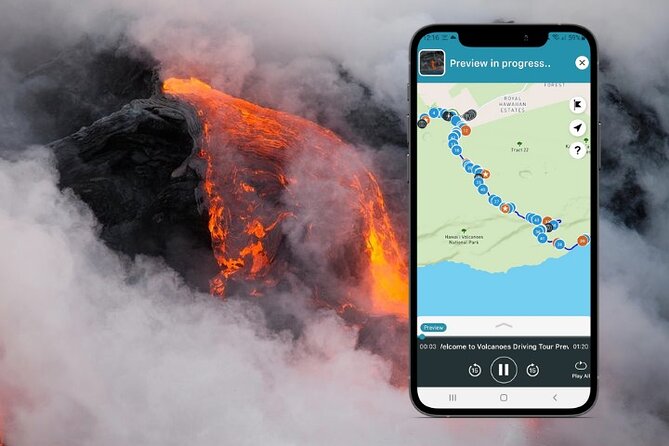
Hawaii Volcanoes National Park is one of those places where you can drive past something unforgettable and still not know what you’re looking at. That’s where this tour helps. Instead of reading every sign at human speed, the audio gives you the “what am I seeing and why it matters” as you roll from stop to stop.
The format is simple: you load the tour in the app, then let GPS guide the timing. You can start, pause, and resume whenever you want, which is handy because Volcanoes days don’t always go to plan. I also like that it includes suggested activity and restaurant recommendations so you can keep the day flowing, not just the park portion.
The route itself is built for a driving visit inside the park—plus a second day block—so you don’t have to decide everything from scratch.
You can also read our reviews of more tours and experiences in Big Island of Hawaii.


Start at the park: learn the myths while you take in the rim

Your first major entry point is the park itself, where the tour suggests about an hour. This is the spot where the audio frames what you’re seeing with Hawaiian myths and legends, so the views feel more grounded and less like random scenery.
Practically, this “orientation hour” matters. If you get the basic story in your head early—Pele, volcanic forces, how the landscape changes—you’ll understand what the lava tube, crater floor, and sea arch have in common as the day unfolds.
Watch the time on this one. The tour gives you an hour at the park, so if you add extra hikes right away, you may start compressing the rest of your day. Also note that the park admission is not listed as included in the tour’s cost, even though the tour plan gives time blocks.
Nahuku–Thurston Lava Tube: the stop that makes volcanology feel tangible
Next up is Nahuku – Thurston Lava Tube, a quick stop (about 30 minutes). This is one of the park’s most popular sights for a reason: you can walk into a lava-formed space and feel how liquid rock once moved like a river.
The tour pairs that with narrative you can listen to while you’re walking and lingering, which helps if you don’t want to stand in front of every plaque. If you’re the type who likes a short, satisfying “wow” stop, this is it.
A heads-up for your planning: lava tube visits can be easy physically, but they still take attention. Keep your phone charged and ready—this is one of those places where you don’t want to be fumbling for directions mid-walk.
Kīlauea Iki Trail: crater-floor energy in a short walk
Then the tour points you to Kilauea Iki Trail (about 30 minutes). This is the crater-floor walk block, where the audio emphasizes the idea of volcano “pulse” through the terrain you’re stepping on.
What’s useful here is the timing. A half hour is enough to get a feel for the crater floor without turning your day into a long grind. If you’re limited on time, or you just want a meaningful walk without overcommitting, this stop fits well.
If you want to make it easier on yourself: use the audio to pace your walk. Let the narration run while you move, then save extra photo time for the moments that actually catch your eye.
Chain of Craters Road + Devastation Trail: the “keep driving” payoff

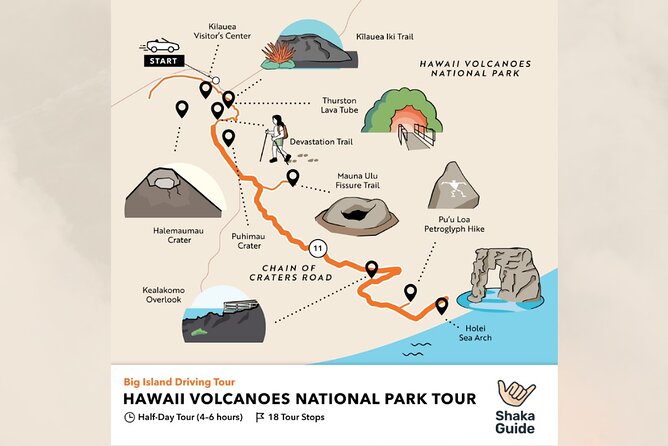
After the lava tube and crater walk, you’ll hit Chain of Craters Road with another short break window (about 30 minutes). This is your rhythm reset. Drive, pull off, stretch, and get back into the “what am I seeing here?” mindset before the next trail.
Right after that comes Devastation Trail (about 30 minutes). The key value of this block is that it gives you a guided way to look at change—how nature lays down new terrain and how the park shows the aftermath of volcanic activity.
The practical drawback to watch: 30 minutes is not a lot if you decide to park far from the trailhead or if the road traffic slows you down. If you’re prone to linger for photos, consider doing a quick photo round early, then use the remaining time for whatever walking you choose.





Pu‘u Loa Petroglyphs: small hike, big cultural weight
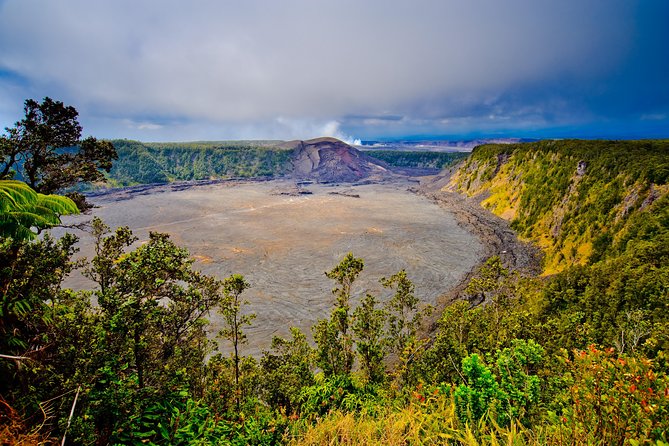
Next is Pu‘u Loa Petroglyphs (about 15 minutes). The tour frames this as an encounter with roughly 23,000 petroglyphs made before Western contact. That’s a lot of marks, and the audio helps you treat it as more than just a quick “look and go.”
There’s a real-world detail that matters: this is a short hike, but it can be hot. Bring water. Even if you don’t feel like a “hiker,” plan to move through some sun and warmth. The time block is short, so dehydration is the kind of problem that can turn a fun stop into a stop-and-stall situation.
If you want a calm visit, keep your phone brightness reasonable. You’ll do better focusing on the carvings (and your footing) rather than fighting glare.
Holei Sea Arch: the 90-foot “where lava meets ocean” moment

Finally on Day 1, you’ll get to Holei Sea Arch (about 30 minutes). The audio guides you toward the towering sea arch (listed as about 90 feet tall) and connects it to its origin as an ancient lava tube, formed roughly 500 years ago.
This stop is great for your “end of day wow factor.” It also gives you contrast: you’ve spent the morning and early afternoon on volcanic features, and now you see how the ocean reshapes the results.
Plan for wind and uneven footing near coastal formations. Even if you’re not far from parking, you may feel exposed when you look out. Take your photos, then give yourself enough time to walk away calmly rather than leaving in a hurry.
Day 2 inside the park: extra time block for your second pass
Day 2 is designed as a return to the park with another hour block. In the tour details, that park stop is marked as admission ticket free for the day-two entry, even though the overall tour notes that entrance fees are not included. The practical takeaway is simple: treat the day-two hour as a planned revisit window, but keep an eye on what you personally need for park access that day.
This second-day structure is a smart option if you want to:
- see what you missed on Day 1,
- slow down at a stop you loved,
- or handle daylight timing (sun angle can change what photos look like).
It’s also helpful if you’re traveling with different energy levels—one person wants a fast drive, another wants to linger longer at one of the featured spots.
Price and logistics: why $18.39 can be a smart deal
The price is listed as $18.39 per group (up to 15), and the duration is about two days. For a driving tour inside Volcanoes, that’s a strong value if you’re in a car with more than one person or if you prefer self-paced learning over paying per person for a narrated bus ride.
Here’s the part that really makes the math work: one purchase supports a full car experience. That means the cost per viewpoint drops fast if you’ve got family or friends along.
You’re also not paying for “just directions.” The tour includes 3–5 hours of audio narration with stories, travel tips, and music, plus turn-by-turn GPS prompts and offline mapping. It’s basically turning the car into your seat on a guide’s timeline, without locking you into a group pace.
Still, remember the separate costs that are not included. Meals and refreshment aren’t part of the experience, and park admission/entrance fees aren’t included in the tour price.
Real-world tradeoffs: download timing and GPS dependence
This kind of GPS audio tour is only as good as your setup. The biggest frustration you can avoid is trying to download while you’re already driving. The tour guidance is clear: you’ll want strong Wi-Fi and a full download before you start using it in the park.
A second issue to plan around is GPS behavior when you change your route. If you jump ahead, skip a stop, or take a different road segment, the audio can fall out of sync with what it expects. You don’t need to be rigid, but you should avoid sudden “I’ll just go this way” decisions if you want the narration to feel perfectly matched.
Also watch for device permissions. Location access matters for GPS-activated narration and turn prompts. If your phone is stingy with permissions, your experience can turn clunky.
Quick prep checklist I’d follow
- Download the tour before you enter the park area with weak service
- Make sure location services are allowed for the app
- Keep your phone charged (car plug helps a lot)
- Have a realistic plan for the short walks, especially the petroglyph stop in heat
Who this Big Island Volcanoes tour fits best
This is a great match if you have a rental car and you want control over timing. Volcanoes works best when you can stop for views, adjust your walking pace, and not feel rushed.
It also makes sense if you’re traveling with kids, teens, or family members who do better with audio than with reading every sign. The narration approach helps you keep moving while still learning what you’re seeing.
If you’re the type who wants a strict itinerary and a guide physically present, this might feel too flexible. The tour does give suggested stops and time blocks, but it’s still self-guided.
Should you book this Volcanoes National Park driving tour?
Book it if you want the park’s big moments—lava tube, crater walk, petroglyphs, sea arch—connected into one easy route with stories you can hear while you drive. The hands-free audio and offline map features are exactly what you want in a place where service can be unreliable and signage can be easy to miss.
Skip or reconsider if you know you won’t have time to set up your phone properly before you drive, or if you prefer a human guide who can adjust instantly to your route choices. The tour is strong when you follow the suggested flow and let the GPS do its job.
If you’re on Big Island with a car and you want value that turns into understanding, this is one of the better ways to do Volcanoes without fighting your way through the park on guesswork.